Unexpected remote audio control in Linux
On your Linux system, in your audio settings, do you see remote systems audio on your local network (mainly macOS devices)? Can you modify their audio settings? Is it annoying? ;-)
What’s the culprit?
It took me a while to find, but it is the RAOP Discover module for Pipewire, the Linux sound system daemon that has become the de-facto default in a lot of distributions, replacing PulseAudio.
It creates a module-raop-sink for each remote audio device discovered with Multicast DNS and DNS Service Discovery (presumably using Avahi-Zeroconf). This, in turn, displays in the common audio device pickers, and of course that also shows up in other apps, such as Discord:
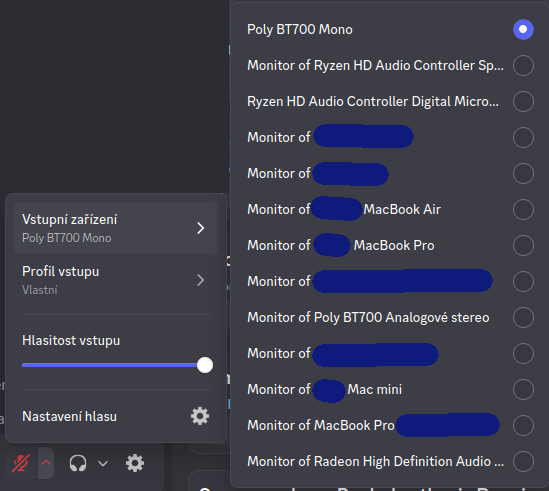
You might notice that there is a lot of Macbooks here. Apparently, in their default configuration, they publish “AirPlay devices” over Zeroconf - multicast DNS - to the local network.
(The screenshot displays a lot of monitor devices, which are essentially a mirrors of their output devices. The respective output devices were also present, in the same amount. I am deliberately not saying the quiet (security) part out loud, because there is apparently some mechanism of consent in the macOS, which I did not explore further here.)
The module responsible is called [libpipewire-]module-raop-discover, and on Arch Linux, you would find it after installing the extra/pipewire-zeroconf package. However, on Fedora 44 Kinoite (which is an “atomic” distribution), the package pipewire-config-raop, which enables the RAOP module, seems to be pre-installed.
It took a while to find the right config
Just a month ago I had known nothing of the stuff I just wrote about. This took me a goddamn while to look up, as although I had suspected some mDNS shenanigans were in play, I could not initially find on the Internet what it really was, and after I found that it is RAOP, I could not find how to unload a module that was loaded by a default setting. Turns out that I did not need to - there is a knob built into the configuration to enable/disable RAOP at will. Specifically, in /usr/share/pipewire/pipewire.conf.avail/50-raop.conf:
context.modules = [
    # Use mDNS to detect and load module-raop-sink
    { name = libpipewire-module-raop-discover
        condition = [ { module.raop = !false } ]
    }
]
The module.raop = false should disable it. But where do I put that?!
It took me three or four attempts to get the exact config placement right, but… here it comes.
Turn RAOP off
So, how do you do that?
(This is for Fedora 44 Kinoite edition. But it might work elsewhere.)
In your $XDG_CONFIG_HOME/pipewire (usually $HOME/.config/pipewire), create an overriding configuration file pipewire.conf.d/disable-raop.conf with content:
context.properties = {
       # Disable RAOP module (remote audio device control via mDNS)
       module.raop = false
}
and restart pipewire, and pipewire-pulse user services (or logout/login your user session):
systemctl --user restart pipewire pipewire-pulse
Alternatively, do not load the libpipewire-module-raop-discover module, and other *-raop-* modules.
And the second alternative could be to override the list of installed packages and manually uninstall the pipewire-config-raop package, that is present by default. But I have not tested that.
Further reading / watching
If you want to know more about Multicast DNS and are fluent in Czech, Petr Krčmář gave a nice talk about it at LinuxDays 2023 in Prague. Slides and video are available.
And, if you want to know more about sharing your audio over the network easily, you can turn to Arch Linux wiki about PipeWire. It has some nice material on the issue.